Choosing your first design tool can feel confusing because every tool has fans. The good news is that design skills such as layout, color and typography transfer between tools. This guide compares Canva, Photoshop and Figma in plain language, helps you choose with a short quiz, and gives you a 14-day plan to start.
In short: pick the tool that matches your first project, finish small projects, and add a second tool only when real work needs it.
🎓 Want to learn this hands-on? Explore the courses at Tech Pulse.
The three tools beginners ask about
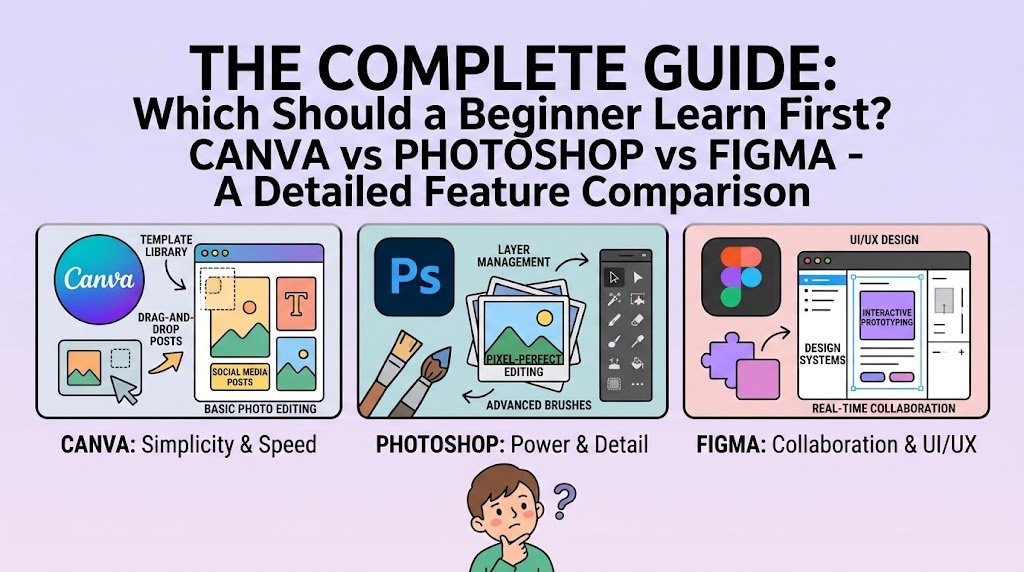
Most beginners compare Canva, Photoshop and Figma. They do different jobs, so the best choice depends on what you want to create. Features and prices change often, so check each tool’s official site before you decide.
Quick comparison
| Question | Canva | Photoshop | Figma |
|---|---|---|---|
| Main purpose | Fast layouts from templates | Photo editing and image compositing | Interface and web design, teamwork |
| Learning curve | Gentle | Steeper | Moderate |
| Good first projects | Social posts, posters, simple flyers | Photo retouching, banners, mockups | App screens, website layouts |
| Runs in | Browser and app | Desktop app | Browser and app |
| Best for | Speed and simplicity | Detailed image control | Layouts, components and collaboration |
Comparison is general guidance only. Plans, prices and features differ, so confirm on the official websites.
Which one should you learn first?
Choose Canva if…
You want quick results for social media posts, simple posters or presentations, and you are still learning layout, spacing and color. Templates help you see what good composition looks like. Just remember to change the template enough that the result is your own work.
Choose Photoshop if…
You work with photos: removing backgrounds, retouching, combining images or making product banners. It takes more time to learn, but it gives you detailed control.
Choose Figma if…
You are interested in website or app design, or you plan to work with developers. Figma is built around frames, components and sharing a design with others.
Find your starting tool: a short quiz
1. What do you want to make first?
Social posts and flyers → Canva.
Photo edits and banners → Photoshop.
Website or app screens → Figma.
2. How much time can you spend each day?
Under 30 minutes → start with Canva and learn design basics first.
One hour or more → any of the three works, so pick by your goal in question 1.
3. Do you plan to sell design services?
Yes → learn one simple tool now and add a second within a few months. Many clients simply want a good result, and our guide on the logo design process shows how to deliver professional work with any tool.
4. Is your budget very small?
Start with free options. Our list of free graphic design tools covers choices that cost nothing.
A 14-day learning plan for any tool
- Days 1–2: Learn the interface, layers or frames, and shortcuts
- Days 3–4: Practice text, alignment and spacing
- Days 5–6: Practice color palettes and contrast
- Days 7–8: Recreate a simple design you like, for practice only
- Days 9–11: Make one original poster or social post
- Days 12–13: Ask for feedback and improve it
- Day 14: Save it as your first portfolio sample
Common beginner mistakes
- Switching tools every week instead of finishing projects
- Relying on a template without understanding why it works
- Using too many fonts and colors
- Using images or fonts without checking their license
Frequently asked questions
Can I get design jobs using only Canva?
Yes, for many simple jobs such as social media posts. For more advanced work you may add other tools later. Clients mostly care about results.
Is Photoshop too hard for beginners?
It has more features, so it takes longer to feel comfortable. Learn one task at a time, such as cropping, then layers, then masks.
Do I need to learn all three?
No. Master one that fits your goal, then add others when a real project needs them.
Related reading
- সেরা ফ্রি গ্রাফিক ডিজাইন টুল
- Logo design process, step by step
- গ্রাফিক ডিজাইন পোর্টফোলিও কীভাবে বানাবেন
🚀 Ready for the next step? See the Tech Pulse courses and learn step by step.
About the author: Reza is a Dhaka-based freelance graphic and web designer. He teaches design and online skills at Tech Pulse.